> For the complete documentation index, see [llms.txt](https://docs.iexexchanger.com/llms.txt). Markdown versions of documentation pages are available by appending `.md` to page URLs; this page is available as [Markdown](https://docs.iexexchanger.com/guide/verifikaciya/verifikaciya-kart.md).
# Верификация карт
Полная инструкция по настройке модуля верификации счетов
Раздел **«Верификация карт»** используется для обработки запросов на проверку банковской карты или другого платёжного счёта. Здесь сотрудник просматривает данные клиента и фотографии, подтверждает или отклоняет проверку, открывает историю повторных попыток и управляет материалами страницы верификации.
{% hint style="info" %}
Эта инструкция описывает работу с очередью проверок и окном верификации внутри обменной заявки.
Условия, при которых проверка запрашивается для отдельных валют и направлений, настраиваются отдельно.
{% endhint %}
{% hint style="warning" %}
Раздел содержит полные номера платёжных реквизитов, фотографии, IP-адреса и другие персональные данные.
Предоставляйте доступ только сотрудникам, которым необходимо проводить проверки.
{% endhint %}
## Где находится раздел
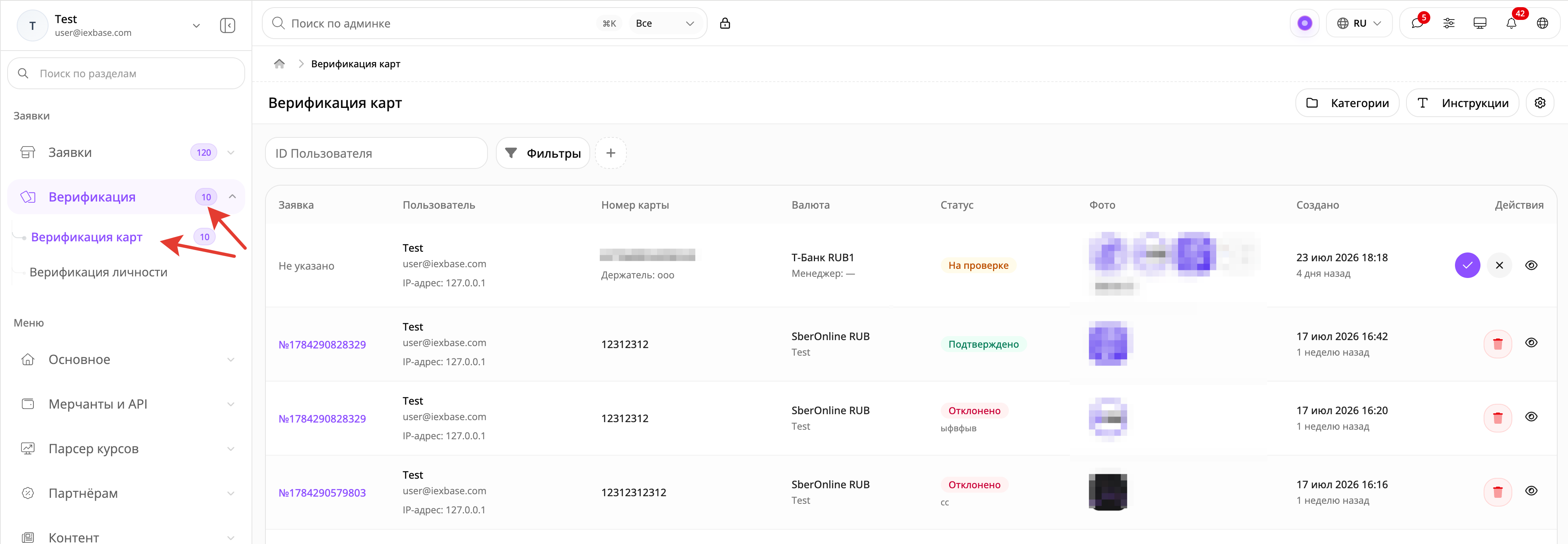
В панели управления откройте: **«Верификация» — «Верификация карт»**
Счётчик рядом с пунктом **«Верификация карт»** показывает количество записей со статусом **«На проверке»**.
## Необходимое право доступа
Для работы с разделом требуется право: **«Разрешить управление верификациями в админпанели»**
Права назначаются для группы пользователей.
В панели управления откройте: **«Пользователи» — «Список групп пользователей»**
Откройте группу, к которой относится сотрудник. Перейдите во вкладку **«Права группы»**, откройте **«Базовое управление»** и включите **«Разрешить управление верификациями в админпанели»**.
После изменения сохраните группу пользователей. При необходимости сотруднику потребуется повторно войти в панель управления.
Это право позволяет:
* просматривать все записи верификации;
* видеть полный номер карты, данные клиента, IP-адрес и фотографии;
* подтверждать и отклонять проверки;
* удалять обработанные записи;
* изменять общие настройки;
* управлять категориями и инструкциями;
* обрабатывать проверку из карточки обменной заявки.
Отдельных прав только на просмотр, принятие решения или изменение настроек в текущей версии нет.
Для перехода из очереди непосредственно в карточку обменной заявки дополнительно требуется право **«Разрешить управление заявками в админпанели»**.
## Как работает очередь
После отправки фотографий создаётся отдельная запись со статусом **«На проверке»**.
Если предыдущая попытка была отклонена и клиент загрузил новые фотографии, создаётся новая запись. Предыдущая попытка остаётся в истории.
Одновременно для одной заявки может существовать только одна активная проверка.
Доступны три статуса:
* **«На проверке»** — решение ещё не принято. Запись можно подтвердить, отклонить или открыть для просмотра.
* **«Подтверждено»** — проверка успешно завершена. Запись можно просмотреть или удалить.
* **«Отклонено»** — проверка не пройдена. В записи сохраняется причина отказа. Её можно просмотреть или удалить.
Подтверждённую или отклонённую запись нельзя вернуть в статус **«На проверке»** и обработать повторно.
## Просмотр фотографий
В строке отображаются миниатюры основной и дополнительных фотографий.
Чтобы открыть галерею, нажмите нужную миниатюру.
Переключайтесь между изображениями через миниатюры или кнопки **«Предыдущее фото»** и **«Следующее фото»**.
Также можно использовать:
* стрелку влево — предыдущее изображение;
* стрелку вправо — следующее изображение;
* `Home` — первое изображение;
* `End` — последнее изображение.
Нажмите **«Открыть»**, чтобы показать выбранную фотографию в новой вкладке.
Основные и дополнительные изображения хранятся в защищённом хранилище. Ссылки для просмотра действуют ограниченное время.
Если ранее открытая ссылка перестала работать, закройте галерею, обновите страницу и откройте фотографию повторно.
{% hint style="warning" %}
Не принимайте решение только по миниатюре.
Откройте каждую фотографию и проверьте полный набор отправленных изображений.
{% endhint %}
## Что проверить перед решением
Перед подтверждением или отклонением сверяйте:
* номер обменной заявки;
* пользователя и его E-mail;
* IP-адрес;
* платёжную систему и валюту;
* номер карты или счёта;
* имя держателя, если оно используется;
* все загруженные фотографии;
* данные реквизита в связанной заявке;
* дату попытки, если клиент отправлял фотографии несколько раз.
Убедитесь, что изображение относится к указанному реквизиту и соответствует инструкции обменного пункта.
Не требуйте от клиента PIN-код, CVV/CVC, пароль от банка, код из SMS или другие секретные данные.
Если такие сведения попали на фотографию, учитывайте внутренние правила безопасной обработки персональных данных.
## Подтверждение проверки
Найдите нужную запись со статусом **«На проверке»** и просмотрите все фотографии.
В столбце **«Действия»** нажмите кнопку с галочкой.
Откроется окно **«Подтверждение действия»**. Ещё раз проверьте номер карты или счёта и нажмите **«Подтвердить»**.
После обработки:
* статус записи меняется на **«Подтверждено»**;
* сохраняется менеджер, выполнивший проверку;
* запись перестаёт учитываться в счётчике ожидающих проверок;
* у связанной заявки снимается этап проверки карты;
* основной статус обменной заявки не меняется;
* клиент может продолжить обычный процесс оплаты;
* запускается уведомление об успешной проверке, если оно включено;
* подтверждённый реквизит может учитываться в следующих обменах этого пользователя при совпадении номера и валюты.
{% hint style="info" %}
Подтверждение карты не означает, что оплата поступила.
Платёж и статус обменной заявки проверяются отдельно.
{% endhint %}
Если запись не связана с обменной заявкой, изменяется только статус самой проверки.
## Отклонение проверки
Откройте запись со статусом **«На проверке»** и просмотрите все фотографии.
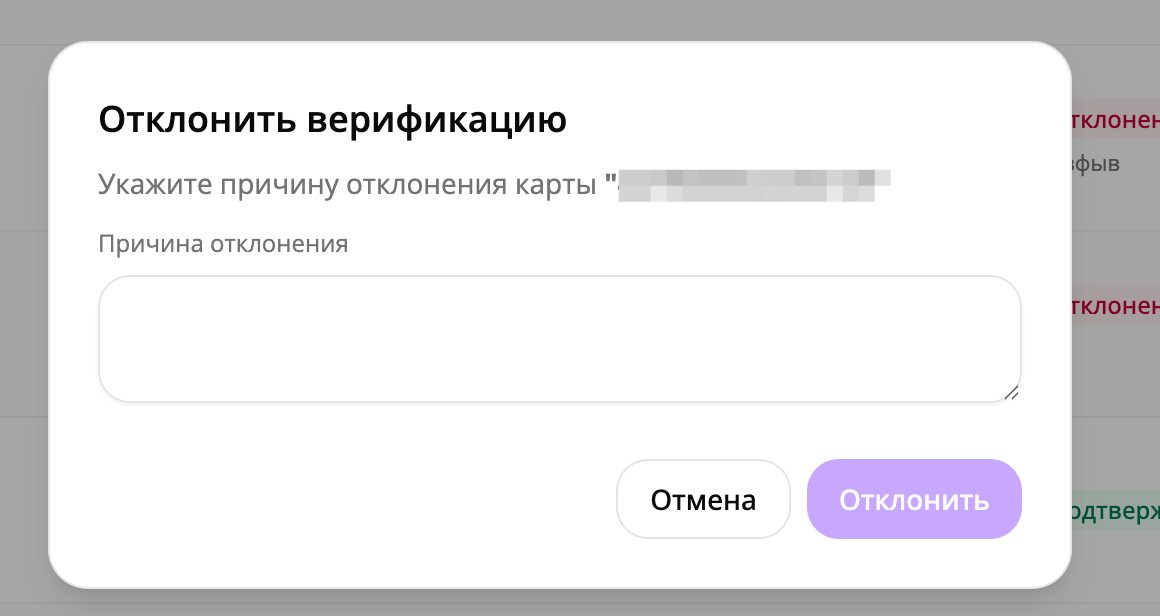
В столбце **«Действия»** нажмите кнопку с крестиком.
Заполните поле **«Причина отклонения»**. Пустое значение и текст из одних пробелов не принимаются. Максимальная длина — 5000 символов.
Нажмите **«Отклонить»**.
После обработки:
* статус меняется на **«Отклонено»**;
* сохраняются менеджер и причина;
* запись перестаёт учитываться в счётчике ожидающих проверок;
* связанная обменная заявка не отменяется;
* этап проверки карты остаётся активным;
* клиент видит причину на странице обмена;
* клиент может нажать **«Повторить»** и отправить новые фотографии;
* следующая попытка создаётся отдельной записью;
* отказ учитывается в количестве неудачных проверок;
* при включённом E-mail-уведомлении клиент получает письмо с причиной.
Причина должна объяснять, что именно необходимо исправить.
Например:
* номер карты не читается;
* реквизит на фотографии не совпадает с заявкой;
* имя держателя закрыто или размыто;
* отсутствует требуемая сторона карты;
* загружена одна и та же фотография;
* изображение не соответствует инструкции.
Не добавляйте внутренние комментарии, правила антифрода и сведения, которые клиенту видеть не следует.
## Одновременная работа сотрудников
Одна проверка может быть обработана только один раз.
Если два сотрудника одновременно открыли запись, сохраняется первое решение, принятое сервером.
Второй сотрудник получает сообщение: **«Заявка уже была обработана ранее»**
После этого список или окно обновляется и показывает фактический статус.
Во время отправки решения действия временно блокируются и отображается состояние **«Обновляем...»**.
## Проверка из обменной заявки
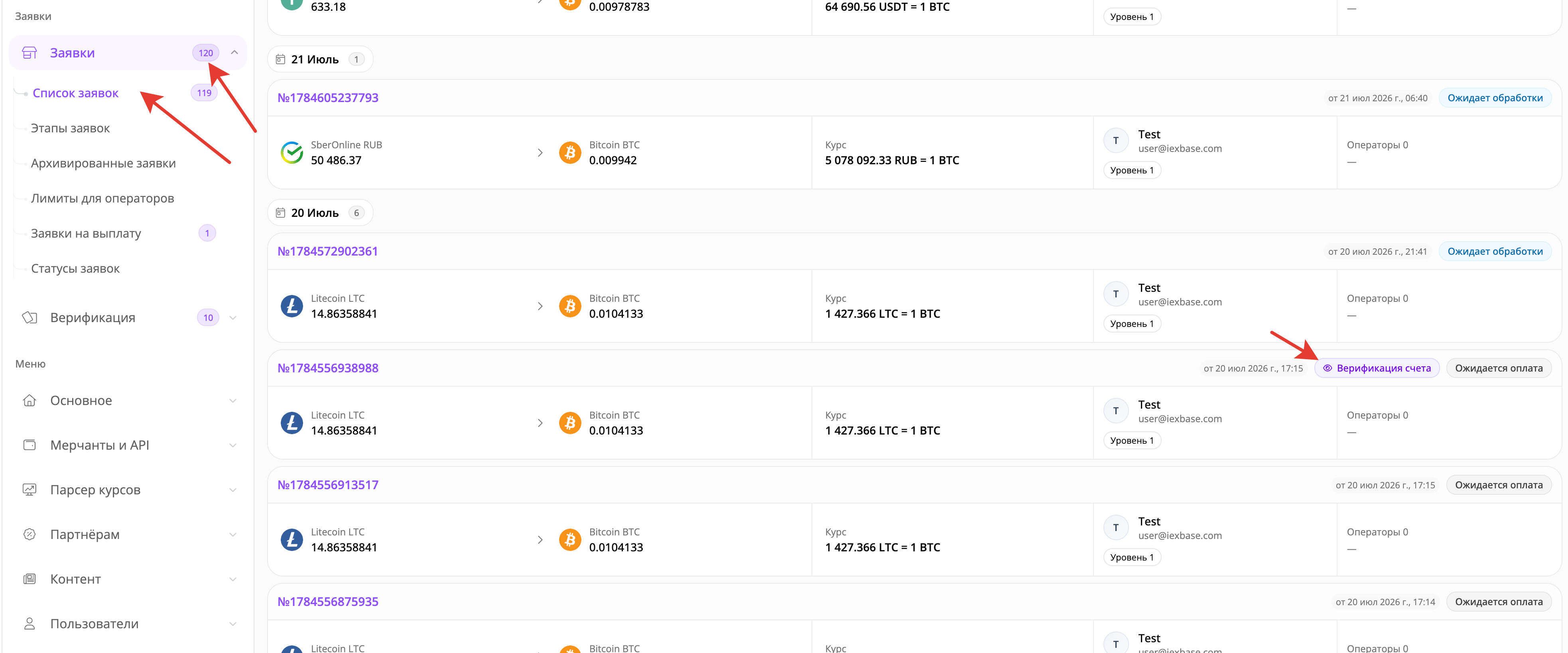
Активную проверку можно открыть непосредственно из списка или карточки обменной заявки.
Рядом с основным статусом может отображаться дополнительная метка:
* **«Верификация счета»** — проверка требуется, но клиент ещё не отправил активную запись;
* **«Проверка номера счета»** — фотографии уже отправлены и ожидают решения.
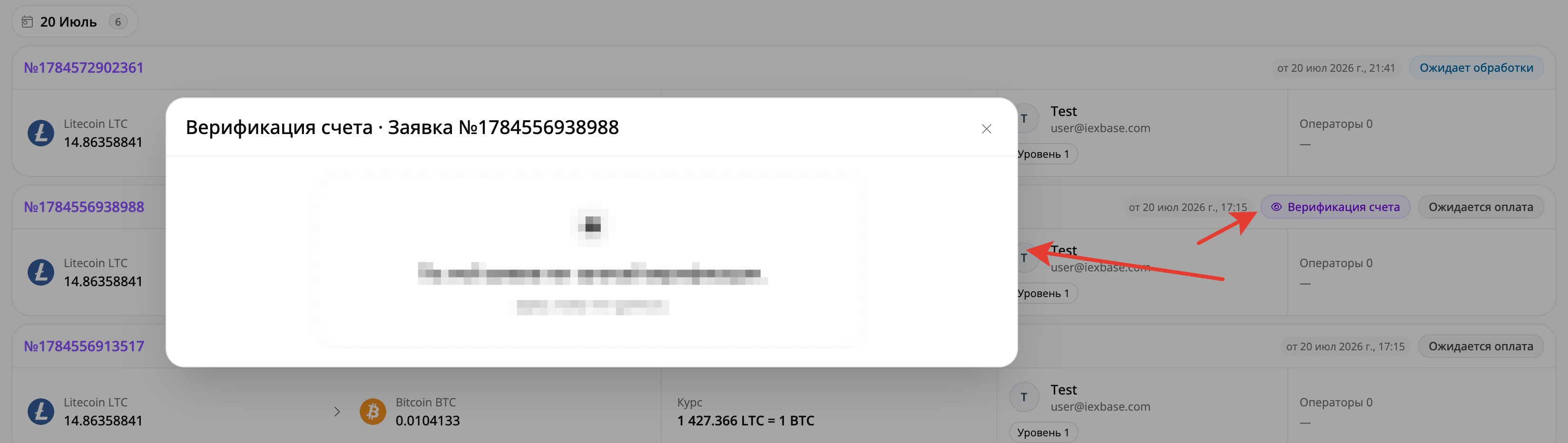
Нажмите метку. Откроется окно: **«Верификация счета · Заявка №…»**
В нём отображаются:
* текущая проверка;
* основное и дополнительные фото;
* номер карты или счёта;
* имя держателя;
* валюта;
* клиент и его E-mail;
* IP-адрес;
* менеджер;
* причина отказа;
* история попыток;
* действия подтверждения и отклонения.
Если по заявке создано несколько попыток, сначала открывается последняя активная запись со статусом **«На проверке»**.
Если активной проверки нет, показывается последняя созданная попытка.
Удалять записи из этого окна нельзя. Для удаления откройте общую очередь **«Верификация карт»**.
После подтверждения дополнительная метка проверки исчезает, но основной статус заявки продолжает изменяться по обычным правилам обработки обмена.
## Удаление записи
Кнопка удаления доступна только у записей со статусом **«Подтверждено»** или **«Отклонено»**.
Запись со статусом **«На проверке»** удалить через интерфейс нельзя.
После удаления:
* запись полностью удаляется;
* удаляются основная фотография, миниатюра и дополнительные файлы;
* попытка исчезает из истории;
* восстановить её через панель управления нельзя;
* подтверждённая карта перестаёт считаться ранее проверенной;
* количество отклонённых попыток пересчитывается;
* у связанной заявки, которая ещё ожидает оплату, этап проверки может появиться повторно.
{% hint style="danger" %}
Не используйте удаление как обычный способ завершить проверку.
Для рабочего решения используйте **«Подтвердить»** или **«Отклонить»**. При удалении безвозвратно теряются фотографии и результат обработки.
{% endhint %}
## Настройка верификации
В правой верхней части страницы нажмите кнопку с иконкой шестерёнки.
Откроется окно **«Настройка верификации»**.
После изменения параметров нажмите **«Сохранить»**.
Настройки являются общими для модуля проверки карт.
{% stepper %}
{% step %}
### Кол-во неудачных попыток верификации
Поле **«Кол-во неудачных попыток верификации»** ограничивает создание новых обменных заявок после повторных отказов.
Укажите целое число от `0` и выше.
`0` полностью отключает ограничение.
Попытки считаются по сочетанию E-mail клиента и валюты.
Для разных валют используются отдельные счётчики.
Учитываются все сохранённые записи со статусом **«Отклонено»** без ограничения по времени.
Ограничение начинает действовать сразу после достижения указанного значения.
Например, при значении `3` доступ ограничивается после третьего отклонения.
{% hint style="warning" %}
Автоматического срока сброса у счётчика нет.
Для восстановления доступа после проверки ситуации можно удалить ошибочные отклонения, увеличить лимит или установить `0`.
{% endhint %}
{% endstep %}
{% step %}
### Информация на странице верификации
Поле **«Информация на странице верификации»** содержит общий мультиязычный текст, который клиент видит над формой загрузки фотографий.
Этот текст используется как резервный. Если для конкретной валюты или направления задано более приоритетное описание, клиент увидит его.
Изменение может отобразиться в уже созданной заявке после обновления клиентской страницы.
{% endstep %}
{% step %}
### Описание (В случае ошибки)
Поле **«Описание (В случае ошибки)»** сохраняет общий мультиязычный текст ошибки.
В текущем клиентском интерфейсе обменной заявки он не выводится. После ручного отклонения клиент видит значение, указанное сотрудником в поле **«Причина отклонения»**.
Поэтому конкретную причину отказа всегда заполняйте при обработке записи.
{% endstep %}
{% step %}
### Автоматическая верификация
Переключатель **«Автоматическая верификация»** автоматически меняет статус последней проверки при опросе результата клиентской страницей.
Он не анализирует фотографии, не использует OCR, искусственный интеллект или внешний сервис и не проверяет совпадение номера карты и имени держателя.
{% hint style="danger" %}
Не включайте **«Автоматическая верификация»** в рабочем обменном пункте без отдельной доработки и полной проверки.
Автоматический режим не выполняет полный сценарий ручного подтверждения: менеджер не сохраняется, этап проверки может остаться в заявке, а стандартные уведомления могут не отправиться.
{% endhint %}
{% endstep %}
{% step %}
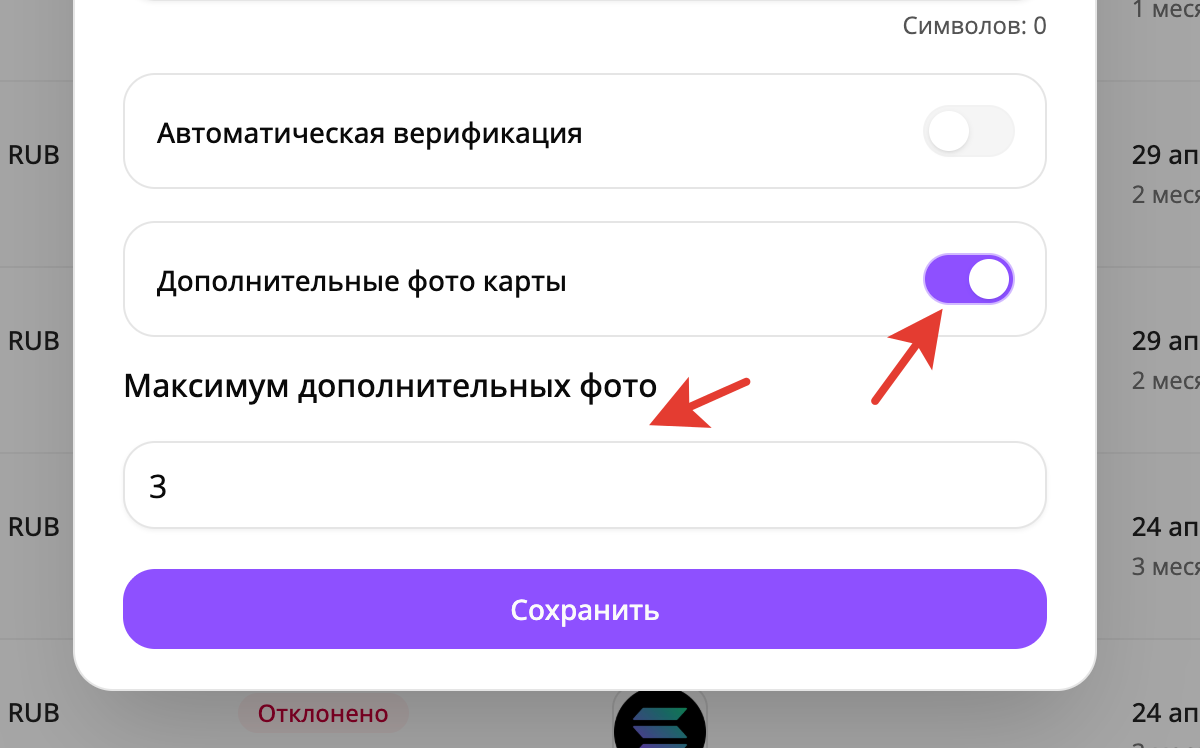
### Дополнительные фото карты
Настройка **«Дополнительные фото карты»** позволяет клиенту приложить несколько изображений вместе с обязательным основным фото.
После включения появляется поле **«Максимум дополнительных фото»**.
Допустимое значение — от `1` до `5`.
Основное фото не входит в этот лимит.
Например, при значении `3` клиент может отправить одно основное и до трёх дополнительных изображений.
Максимально можно отправить одно основное и пять дополнительных фотографий.
Поддерживаются JPG, JPEG и PNG размером до 10 МБ каждый.
Одинаковые по содержимому файлы в одной отправке отклоняются.
Отключение настройки не удаляет уже загруженные фотографии. Сохранённый лимит также не стирается.
{% endstep %}
{% endstepper %}
***
## Когда изменения становятся видны клиенту
Категории, инструкции и общий текст не сохраняются отдельной копией внутри каждой заявки.
Клиент получает актуальные материалы при загрузке страницы.
Поэтому:
* открытая проверка может показать новый текст после обновления;
* отключение категории скрывает её и в уже созданных заявках;
* удаление инструкции влияет на текущие и будущие проверки;
* настройка дополнительных фотографий появляется после повторной загрузки клиентской страницы.
Перед значительным изменением инструкций проверьте результат на тестовой заявке.
## Уведомления и счётчик
Новая запись со статусом **«На проверке»**:
* увеличивает счётчик возле пункта **«Верификация карт»**;
* создаёт приоритетное уведомление в панели управления;
* может сопровождаться звуковым сигналом;
* может отправить E-mail или Telegram-сообщение администратору, если соответствующие уведомления включены.
После подтверждения или отклонения запись перестаёт учитываться в счётчике.
Для клиента могут использоваться отдельные письма об успешной и неуспешной проверке. Их отправка зависит от настроек уведомлений.
Уведомление сообщает о новой проверке, но решение следует принимать только после просмотра всех фотографий в очереди.
Если очередь была открыта до поступления новой записи, строка может не появиться автоматически. Обновите страницу, особенно если счётчик уже изменился.
## Порядок работы сотрудника
1. Откройте **«Верификация» — «Верификация карт»**.
2. Выберите статус **«На проверке»**.
3. При необходимости найдите запись по заявке, пользователю, номеру карты или IP-адресу.
4. Откройте все фотографии.
5. Сверьте пользователя, реквизит, валюту и связанную заявку.
6. Подтвердите проверку или укажите понятную причину отклонения.
7. Убедитесь, что запись получила итоговый статус.
8. Проверьте, что в строке отображается менеджер.
9. Для связанной заявки проверьте дополнительную метку этапа.
10. Не удаляйте запись, если достаточно подтверждения или отклонения.
## Проверка результата
### После подтверждения
Убедитесь, что:
* запись получила статус **«Подтверждено»**;
* отображается менеджер;
* счётчик ожидающих проверок уменьшился;
* в связанной заявке больше нет активного этапа проверки карты;
* основной статус заявки не был принят за подтверждение оплаты;
* клиент может продолжить платёжный процесс.
### После отклонения
Убедитесь, что:
* запись получила статус **«Отклонено»**;
* причина сохранилась полностью;
* клиент видит причину;
* заявка остаётся на этапе проверки;
* клиент может повторно отправить фотографии;
* новая попытка создаётся отдельной записью.
## Ограничения текущей версии
В текущей версии:
* записи обрабатываются только по одной;
* нет отдельного состояния **«В работе у менеджера»**;
* нет отдельных прав на просмотр, решения и настройки;
* итоговое решение нельзя изменить;
* автоматическая верификация не анализирует изображение и не завершает полный рабочий процесс;
* поле **«Описание (В случае ошибки)»** не выводится в клиентском интерфейсе заявки;
* статус отдельной инструкции не гарантирует её скрытие;
* порядок отдельных инструкций на клиентской странице не гарантирован;
* новая запись может не появиться в открытой таблице без обновления страницы.
## Если раздел не отображается
Проверьте право **«Разрешить управление верификациями в админпанели»** в группе сотрудника.
Убедитесь, что изменения группы сохранены и она назначена пользователю.
После изменения выполните повторный вход в панель управления.
## Если счётчик показывает записи, а список пуст
Очистите поиск, валюту и остальные фильтры.
Затем снова выберите статус **«На проверке»**.
Счётчик учитывает все ожидающие записи, а таблица может быть ограничена сохранёнными условиями поиска.
## Если нет кнопок подтверждения и отклонения
Эти действия доступны только для записей со статусом **«На проверке»**.
Если проверка уже подтверждена или отклонена, откройте **«Подробнее»** либо историю связанной заявки.
## Если отклонение недоступно
Проверьте поле **«Причина отклонения»**.
Оно не должно быть пустым или состоять только из пробелов.
## Если запись уже обработана
Другой сотрудник принял решение раньше.
Обновите список и используйте фактический статус, сохранённый системой.
## Если фотография не открывается
Временная ссылка могла закончиться.
Закройте галерею, обновите страницу и откройте фотографию повторно.
Если после обновления отображается **«Нет фото»**, файл отсутствует или запись создана в старом либо повреждённом формате.
## Если в поле заявки указано «Не указано»
Проверка не связана с конкретной обменной заявкой.
Используйте данные пользователя, карты, валюты и IP-адреса.
Подтверждение такой записи не может изменить состояние обменной заявки.
## Если клиент продолжает видеть проверку после подтверждения
Обновите карточку заявки и клиентскую страницу.
Убедитесь, что подтверждена правильная активная запись.
Проверьте, не включена ли **«Автоматическая верификация»**. Текущий автоматический режим может изменить статус записи, не сняв этап проверки со связанной заявки.
## Если клиент не может создать новую заявку
Проверьте **«Кол-во неудачных попыток верификации»**.
Счётчик является накопительным и не сбрасывается по времени.
Найдите отклонённые записи по E-mail и валюте. После анализа ситуации удалите ошибочные отказы, увеличьте лимит или установите `0`.
## Если выключенная инструкция продолжает отображаться
Это ограничение текущей версии.
Переместите инструкцию в отключённую категорию или удалите её, если восстановление не потребуется.
## Если порядок инструкций отличается
Порядок отдельных инструкций на клиентской странице не гарантируется.
Порядок категорий применяется корректно.
После каждого изменения проверяйте фактическое отображение в тестовой заявке.
## Если общий текст ошибки не отображается
Клиентский интерфейс показывает причину, указанную сотрудником при отклонении, а не значение поля **«Описание (В случае ошибки)»**.
Заполняйте понятную причину непосредственно при обработке проверки.
---
# Agent Instructions
This documentation is published with GitBook. GitBook is the documentation platform designed so that both humans and AI agents can read, navigate, and reason over technical content effectively. Learn more at gitbook.com.
## Querying This Documentation
If you need additional information that is not directly available in this page, you can query the documentation dynamically by asking a question.
Perform an HTTP GET request on the current page URL with the `ask` query parameter, and the optional `goal` query parameter:
```
GET https://docs.iexexchanger.com/guide/verifikaciya/verifikaciya-kart.md?ask=&goal=
```
`ask` is the immediate question: it should be specific, self-contained, and written in natural language.
`goal` is optional and describes the broader end goal you are ultimately trying to accomplish on behalf of the user. GitBook uses it to tailor the answer towards what is most useful for that goal.
The response will contain a direct answer to the question and relevant excerpts and sources from the documentation.
Use this mechanism when the answer is not explicitly present in the current page, you need clarification or additional context, or you want to retrieve related documentation sections.